How to Troubleshoot a Hobart Meat Slicer
For Hobart meat slicer repair, disconnect power before inspecting or cleaning the machine. Check the outlet, controls, carriage, blade area, and thickness setting, then contact an authorized service provider if a fault remains.
On this page (9 sections)
- What should you check first when a Hobart slicer has a problem?
- Why won't a Hobart meat slicer turn on?
- Why is the Hobart slicer blade not moving smoothly?
- How can you fix uneven slices or a thickness setting that won't hold?
- Could cleaning solve a Hobart slicer problem?
- When does Hobart meat slicer repair require a technician?
- What slicer options fit different food-prep needs?
- How do you decide between troubleshooting and replacement?
- What is the safest next step for Hobart meat slicer repair?
For Hobart meat slicer repair, disconnect power before inspecting or cleaning the machine. Check the outlet, controls, carriage, blade area, and thickness setting, then contact an authorized service provider if a fault remains.
A slicer is commercial equipment with a sharp, powered blade. Use its model-specific manual for cleaning, adjustments, and service instructions, and don't bypass guards or switches to keep it running.
What should you check first when a Hobart slicer has a problem?
Start with the simple external checks, then stop if the machine still behaves abnormally. Turn it off, unplug it, and make sure the blade has stopped before touching nearby parts.
Find the model and serial information so you can match the instructions to your machine. Hobart slicer designs and service steps vary, so don't assume that a procedure for one model applies to another.
Before troubleshooting, note what happened: whether the slicer powers on, whether the carriage moves, what the cut looks like, and whether you heard a new sound. This description can help a service technician identify the next step.
A commercial-grade meat slicer guide explains the features that separate commercial equipment from home models. For a plain definition, see what a commercial meat slicer is.
Why won't a Hobart meat slicer turn on?
Check the power connection and operating controls, but don't open the electrical housing. Confirm the plug is seated and the outlet works with another safe appliance, then reset a tripped breaker only if you know it is safe to do so.
If the breaker trips again, stop using the slicer. Repeated trips can signal an electrical or mechanical fault that needs a technician.
Check the manual for the correct start procedure and any interlock or guard requirements. Never tape down a switch or defeat a safety feature to make the motor run.
A humming sound without blade movement, a burning smell, visible cord damage, or a hot plug calls for immediate shutdown and service. Keep the machine unplugged until it has been inspected.
What if the slicer starts and then stops?
Stop and identify whether the shutdown repeats under normal use. Don't keep restarting a slicer that stalls, trips protection, or smells hot.
With power disconnected, check only for an obvious obstruction in areas your manual permits you to inspect. Remove food residue using the approved cleaning steps; don't put fingers near the blade edge.
A recurring stop can involve the motor, switch, drive, or another internal part. Those checks belong with a qualified service provider, not a user troubleshooting routine.
Why is the Hobart slicer blade not moving smoothly?
Stop using the slicer if the blade binds, wobbles, or makes a new grinding sound. Unplug the machine and check for visible food buildup only after the blade is fully stopped.
Clean the blade area and removable parts as the manual directs. Use the specified tools and precautions, because blade edges remain hazardous when the motor is off.
Don't force the carriage or try to turn a jammed blade by hand. A worn drive component, loose part, or damaged blade can look like a cleaning issue but needs service.
When you call, describe the sound and whether it occurs during startup, while slicing, or when the machine is empty. Avoid running it again just to reproduce the fault.
How can you fix uneven slices or a thickness setting that won't hold?
Check the thickness control and food carriage before assuming the blade needs adjustment. Turn the slicer off, unplug it, and verify that the setting matches the cut you intended.
Secure food using the machine's carriage and food holder as designed. Do not hold food by hand against the blade or push harder to compensate for poor cuts.
If the thickness knob moves freely, slips, or won't return to zero as expected, stop using the slicer. Don't remove covers or adjust internal stops unless the manual explicitly gives that procedure to the operator.
A blade that appears dull or damaged also needs attention. Use only model-approved sharpening instructions or arrange service; sharpening at the wrong angle can affect the cut and create a hazard.
Could cleaning solve a Hobart slicer problem?
Yes, food buildup can interfere with smooth carriage movement and cleaning access, but cleaning won't fix an electrical or mechanical fault. Disconnect power and follow the Hobart manual for removing parts and cleaning the blade area.
Don't spray water into motor openings, switches, or electrical parts. Dry parts as instructed and reinstall guards and removable components before returning the slicer to service.
A slicer that still binds, leaks lubricant, or makes unusual noise after proper cleaning should be checked by a technician. Never use the machine with a missing guard or a part that won't seat correctly.
When does Hobart meat slicer repair require a technician?
Call a qualified technician for electrical symptoms, damaged parts, or any fault that remains after permitted cleaning and basic checks. Keep the slicer unplugged and mark it out of service so another worker doesn't use it.
Seek service for a blade that wobbles or won't stop, repeated breaker trips, exposed wiring, smoke, burning odors, grinding, or a damaged guard. These are not safe do-it-yourself repair jobs.
Have the model and serial number ready, along with a short description of the symptom and when it occurs. Ask whether the technician is qualified to service your specific Hobart model and what parts or cleaning steps you should avoid before the visit.
What slicer options fit different food-prep needs?
Choose a slicer based on the volume and food you need to cut, not as a substitute for repairing a Hobart machine. These options cover light commercial batches, home use, and occasional carving.
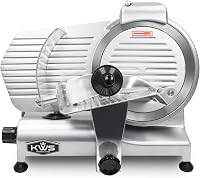
The KWS KitchenWare Station 10NS has a 10-inch stainless steel blade, adjustable thickness up to 14 mm, and a built-in sharpener. Its removable carriage, hand guard, blade, and blade cover support cleaning after repeat prep.
The Cuisinart Kitchen Pro is a countertop option with a 7.5-inch stainless steel blade and a slice control knob from 1/32 to 1/2 inch. Its blade, food guide, and carriage are removable for cleanup.
The NutriChef electric carving knife is a handheld alternative for serving cooked meats and bread. It includes separate carving and bread blades, plus a safety lock and wooden storage stand.
How do you decide between troubleshooting and replacement?
Repair the Hobart when the machine suits your workload and a technician can identify a serviceable fault. Compare the repair needs with the cost and fit of an alternative before replacing equipment.
For recurring high-volume meat and cheese slicing, the KWS offers a 10-inch blade and features aimed at repeat prep. For smaller countertop jobs, the Cuisinart's 7.5-inch blade and adjustable thickness may be enough.
The NutriChef is a carving knife, not a motorized carriage slicer, so it serves a different task. Choose it for occasional carving at the table rather than replacing a commercial slicer in daily service.
What is the safest next step for Hobart meat slicer repair?
For Hobart meat slicer repair, unplug the machine, check only the controls and removable areas allowed by its manual, and call a qualified technician for persistent or hazardous faults. Never run a slicer with a damaged guard, unstable blade, or electrical warning sign.
Choose repair when the fault is serviceable and the slicer still fits your workload. Consider another machine only after comparing its intended use with the commercial requirements in [What Is a Commercial Meat Slicer?
The Straight Answer](/what-is-a-commercial-meat-slicer/).
Frequently asked questions
Why is my Hobart meat slicer not turning on?
Check that the slicer is connected to a working outlet and that its controls are set as the manual directs. Keep the blade area clear and disconnect power before checking for visible obstruction or damage.
If power is present but the machine stays off, stop and contact Hobart service or a qualified technician.
Why is a Hobart slicer cutting uneven slices?
Uneven slices can come from a thickness setting that has shifted, food that is not held firmly, or a blade that needs service. Turn the slicer off and unplug it before checking the food carriage and visible blade area.
Don't adjust internal parts; ask a technician if the cut remains uneven.
Can I sharpen a Hobart meat slicer blade myself?
Only use a sharpener and sharpening steps approved for your exact Hobart model. The blade is sharp even when the machine is off, so disconnect power and follow the manual's precautions.
If you lack the model instructions or see blade damage, leave sharpening and repair to a qualified service provider.
When should a Hobart slicer be repaired by a technician?
Call a qualified technician for damaged wiring, repeated breaker trips, unusual grinding or burning smells, a blade that wobbles, or controls that fail to stop the machine. Disconnect power and take the slicer out of service until it is checked.
Don't bypass guards or attempt internal electrical repairs.